
Morning coffee in hand, I was looking at my desktop wondering whether I really needed a separate app just for the business tax return. If you run a partnership, an S-Corp, or manage a trust, you probably asked yourself the same question.
Here’s the short answer: most consumer tax software only handles Schedule C. For Form 1041 (trusts and estates), Form 1065 (partnerships), or Form 1120-S (S-Corps), you need a dedicated product — and they tend to cost more than your regular personal return software.
TurboTax Business is $134 on Black Friday (list price $190). TaxAct Business runs $140 to $165. Neither includes personal tax returns.
H&R Block Premium & Business is the exception I keep coming back to. On sale at Amazon, Newegg, or Walmart, it’s as low as $50. For context, H&R Block Deluxe + State — personal returns only — sells for $30 on sale. So you’re paying just $20 extra for the full business program.
This isn’t a sponsored post. I’ve been using this software since 2018, and here’s what I’ve learned.
Two Apps in One Package
H&R Block Premium & Business installs two separate apps: H&R Block Premium for personal returns, and H&R Block Business for business and trust/estate returns. The latter is built by ATX (owned by Wolters Kluwer), the same company that makes professional tax software for CPAs.
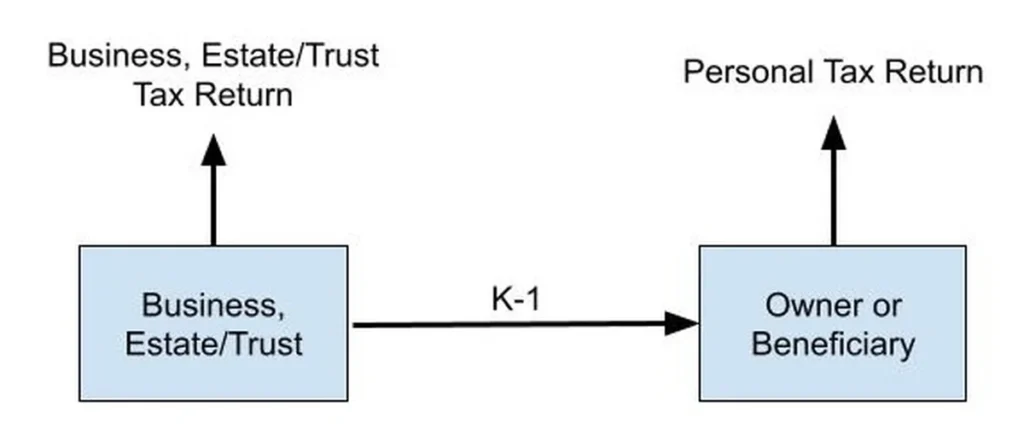
They don’t talk to each other directly. You generate your K-1s in H&R Block Business, then enter them into whatever app you use for personal taxes — even if it’s not H&R Block Premium.
The business side works well but doesn’t hold your hand much. There’s an interview wizard, sure, but the explanations are sparse. It feels like filling out forms one section at a time. If your return is straightforward or you can reference last year’s filing, it gets the job done cleanly. You can e-file federal 1041, 1065, or 1120-S plus state returns for several states, or print and mail.
I haven’t hit a limit on how many returns you can generate in one go.
Things to Know Before You Buy
{{image:cover.webp}}
Windows only. The Premium & Business bundle is Windows-only because H&R Block Business doesn’t run on Mac. If your machine runs macOS, you’ll need a Windows PC.
ARM processors are not supported (2025 version). H&R Block Business 2025 uses RavenDB, which doesn’t work on Windows ARM64. So you can’t run it in an ARM-based Windows virtual machine on Apple Silicon Macs. The 2024 and earlier versions didn’t have this issue.
Run as Administrator on Windows 11. H&R Block Business 2025 requires admin rights to launch. Right-click the shortcut and select “Run as Administrator” if you get an error. Earlier versions didn’t need this.
Back up your return data. The software stores everything in a local database. When you finish a return, export it to a backup file (like myreturn.atx25Export). That backup is readable only by the same year’s software — so a 2025 export opens in the 2025 version, not 2026.
This YouTube video walks through how to export and restore a backup.
Keep the installer file. If you install next year’s version on the same computer, it finds last year’s data automatically. But if you switch computers, the new machine can’t read an exported backup directly — you need the original year’s software installed first to restore it. Save the installer and activation code alongside your backup for each tax year.
Form release dates vary. Some forms aren’t available right away. ATX tracks estimated release dates here — bookmark it so you know when your specific form will be ready.
Security Note for the 2025 Version
Researcher Yifan Lu found a security issue in H&R Block Business 2025. The program installs a root certificate that can let a network attacker intercept your otherwise secure connections to other sites.
If you want to remove it: press Windows Key + R, type certlm.msc, expand Trusted Root Certification Authorities > Certificates, find “WK ATX ServerHost 2024,” right-click and delete. Your computer is only affected if it’s running H&R Block Business on Windows.
More details at Yifan Lu’s site — interestingly, if your browser shows a security warning on that page, it means the certificate issue is already affecting you.
Worth It?
Verdict: Worth it for simple returns.
Tax professionals charge well over $1,000 for business and trust tax returns. If your situation isn’t complicated or there are no major changes from last year, DIY with H&R Block Premium & Business at $50 is a serious savings. There’s a learning curve — the software leans professional rather than hand-holding — but finishing a return you could have paid a thousand dollars for feels good.
If you need Mac support or run an ARM processor on the 2025 version, look elsewhere. Otherwise, this deal is hard to pass up when it hits $50.
FAQ
Does H&R Block Premium & Business include personal tax returns?
Yes. It installs two apps: one for personal returns (H&R Block Premium) and one for business/trust returns (H&R Block Business). TurboTax Business and TaxAct Business do not include personal returns.
Can I use H&R Block Business on a Mac?
No. H&R Block Business runs on Windows only, so the entire Premium & Business bundle is Windows-only. The 2025 version also doesn’t support ARM processors.
How many returns can I file in one installation?
I haven’t seen a limit stated. The software handles multiple returns — you can create both a business return and a trust/estate return in the same program.
Daily Pick: H&R Block Premium & Business at $50 on sale — best value I’ve found for DIY business tax returns. Deal’s live while available at Amazon, Newegg, and Walmart.
A note from Dana: I once paid a friend who does taxes to handle my LLC return. After doing it myself with H&R Block Business that same year, the math was obvious. Still do it every year since.